
Setup

Meta's
Conversions API
&
Pixel in Less than 10 mins
Pixel in Less
than 10 mins
No developer. No confusion. No frustration.
Just point, click and you're done.
" height="100.6684426229508px" id="ma1DKTrBT" transform="translate(0 0)" width="88.76467964518449px"/><path d="M 15.897 30.055 L 0 76.25 C 4.86 77.681 9.901 78.408 14.968 78.408 C 21.138 78.408 27.055 77.342 32.563 75.405 C 32.416 75.173 32.29 74.929 32.186 74.675 Z M 61.46 0 C 61.688 1.688 61.817 3.499 61.817 5.448 C 61.817 10.825 60.812 16.869 57.788 24.427 L 41.603 71.22 C 57.355 62.034 67.95 44.969 67.95 25.422 C 67.951 16.21 65.598 7.547 61.46 0 Z" fill="rgb(33, 117, 155)" height="78.40846721311476px" id="vdGl3t_2R" transform="translate(38.017 27.562)" width="67.9504429467883px"/></g></svg>)
" height="32px" id="xF0bVmvvR" width="40px"/></svg>)
" height="69px" id="NxRFF0ru6" transform="translate(34 0)" width="295.9px"/><path d="M 33 370.4 L 0 0 L 362.8 0 L 329.8 370.2 L 181.1 411.4" fill="rgb(228, 77, 38)" height="411.4px" id="v4P_5GIsc" transform="translate(0 100.5)" width="362.79999999999995px"/><path d="M 0 349.5 L 0 0 L 148.3 0 L 120 316" fill="rgb(241, 101, 41)" height="349.5px" id="GBPQmVsU7" transform="translate(181.5 131)" width="148.29999999999995px"/><path d="M 0 0 L 114 0 L 114 45.4 L 49.8 45.4 L 54 91.9 L 114 91.9 L 114 137.2 L 12.4 137.2 M 14.4 160 L 60 160 L 63.2 196.3 L 114 209.9 L 114 257.3 L 20.8 231.3" fill="rgb(235, 235, 235)" height="257.30000000000007px" id="CyozgdR8b" transform="translate(67.5 176.5)" width="114px"/><path d="M 113.8 0 L 0 0 L 0 45.4 L 109.6 45.4 M 105.5 91.9 L 0 91.9 L 0 137.3 L 56 137.3 L 50.7 196.3 L 0 209.9 L 0 257.1 L 93 231.3" fill="rgb(255, 255, 255)" height="257.1px" id="XOiUNaVC2" transform="translate(181.5 176.5)" width="113.80000000000001px"/></g></svg>)
"/><stop offset="1" stop-color="rgb(143, 1, 130)"/></linearGradient><linearGradient id="JsoQaAseI-2255077377-linear-gradient" x1="1" x2="0" y1="0.2729855317795909" y2="0.7270144682204092"><stop offset="0" stop-color="rgb(143, 1, 130)"/><stop offset="1" stop-color="rgb(255, 152, 176)"/></linearGradient><linearGradient id="pymFQODqf-2255077377-linear-gradient" x1="0.33671501612872723" x2="0.6632849838712728" y1="5.551115123125783e-17" y2="1"><stop offset="0" stop-color="rgb(255, 152, 176)"/><stop offset="1" stop-color="rgb(143, 1, 130)"/></linearGradient><linearGradient id="PYUwiuDld-2255077377-linear-gradient" x1="0.49751243781094523" x2="0.5024875621890548" y1="0" y2="1"><stop offset="0" stop-color="rgb(255, 152, 176)"/><stop offset="1" stop-color="rgb(143, 1, 130)"/></linearGradient></defs><g d="M 0 0 L 150 0 L 150 150 L 0 150 Z M 40.917 130.27 L 7.917 130.27 C 5.877 130.27 4.507 128.28 5.167 126.39 L 41.247 19.5 L 74.577 19.5 L 38.317 126.34 C 37.607 128.42 38.647 130.27 40.917 130.27 Z M 8.47 130.64 L 41.28 130.64 C 43.84 130.64 46.25 129.5 47.91 127.61 L 114.18 50.5 L 87.57 50.5 C 85.58 50.5 83.69 51.3 82.27 52.77 L 9.08 129.74 C 8.37 130.5 7.71 130.45 7 130.31 C 7.62 130.64 8.04 130.64 8.47 130.64 Z M 87.122 50.5 L 119.312 50.5 C 124.192 50.5 124.852 55.14 122.102 58.17 C 115.572 65.37 110.032 71.14 103.782 82.79 C 95.682 97.75 94.882 132.73 125.132 128.24 C 119.072 130.23 112.632 130.65 108.702 130.65 L 92.182 130.65 C 90.902 130.65 86.262 130.22 83.852 129.51 C 59.092 121.79 71.972 77.34 88.022 58.22 C 91.242 54.39 89.872 50.88 87.262 50.55 C 87.072 50.5 87.262 50.5 87.122 50.5 Z M 115 105 L 145.82 105 C 143.41 117.4 134.13 130.66 108.47 130.66 L 92.52 130.66 C 90.11 130.66 85.84 130.09 84 129.52 C 110.37 128.62 113.49 112.95 115.01 105 Z" fill="transparent" height="150px" id="EbF3dhvA8" width="150px"><path d="M 0 0 L 150 0 L 150 150 L 0 150 Z" fill="transparent" height="150px" id="NkPM6JHJT" width="150px"/><path d="M 35.917 110.77 L 2.917 110.77 C 0.877 110.77 -0.493 108.78 0.167 106.89 L 36.247 0 L 69.577 0 L 33.317 106.84 C 32.607 108.92 33.647 110.77 35.917 110.77 Z" fill="url(%23xfKGli8ox-2255077377-linear-gradient)" height="110.76999999999998px" id="xfKGli8ox" transform="translate(5 19.5)" width="69.577315259616px"/><path d="M 1.47 80.14 L 34.28 80.14 C 36.84 80.14 39.25 79 40.91 77.11 L 107.18 0 L 80.57 0 C 78.58 0 76.69 0.8 75.27 2.27 L 2.08 79.24 C 1.37 80 0.71 79.95 0 79.81 C 0.62 80.14 1.04 80.14 1.47 80.14 Z" fill="url(%23JsoQaAseI-2255077377-linear-gradient)" height="80.13999999999999px" id="JsoQaAseI" transform="translate(7 50.5)" width="107.18000000000006px"/><path d="M 17.122 0 L 49.312 0 C 54.192 0 54.852 4.64 52.102 7.67 C 45.572 14.87 40.032 20.64 33.782 32.29 C 25.682 47.25 24.882 82.23 55.132 77.74 C 49.072 79.73 42.632 80.15 38.702 80.15 L 22.182 80.15 C 20.902 80.15 16.262 79.72 13.852 79.01 C -10.908 71.29 1.972 26.84 18.022 7.72 C 21.242 3.89 19.872 0.38 17.262 0.05 C 17.072 0 17.262 0 17.122 0 Z" fill="url(%23pymFQODqf-2255077377-linear-gradient)" height="80.14999999999998px" id="pymFQODqf" transform="translate(70 50.5)" width="55.13171886981604px"/><path d="M 31 0 L 61.82 0 C 59.41 12.4 50.13 25.66 24.47 25.66 L 8.52 25.66 C 6.11 25.66 1.84 25.09 0 24.52 C 26.37 23.62 29.49 7.95 31.01 0 Z" fill="url(%23PYUwiuDld-2255077377-linear-gradient)" height="25.659999999999968px" id="PYUwiuDld" transform="translate(84 105)" width="61.819999999999936px"/></g></svg>)
" height="2097.9411764705883px" id="S76HjnTqj" width="2515.2941176470586px"/><path d="M 547.353 1310.588 C 577.668 1260.259 637.75 1236.226 694.412 1251.765 C 719.946 1260.628 747.985 1258.745 772.105 1246.546 C 796.225 1234.347 814.359 1212.879 822.353 1187.059 C 842.295 1133.481 816.313 1073.723 763.529 1051.765 C 712.193 1028.361 683.168 973.214 692.941 917.647 C 702.048 859.486 751.442 816.158 810.294 814.706 C 868.455 813.478 915.036 766.114 915.294 707.941 C 915.02 649.09 867.38 601.45 808.529 601.176 L 806.765 601.176 C 747.791 599.434 697.808 557.253 686.176 499.412 C 682.971 482.405 682.971 464.948 686.176 447.941 C 692.264 409.82 716.354 376.97 750.882 359.706 C 801.253 332.447 821.323 270.424 796.471 218.824 C 777.589 164.117 717.973 135.032 663.235 153.824 C 636.65 164.466 607.144 165.3 580 156.176 C 556.668 145.678 536.416 129.375 521.176 108.824 C 497.844 77.711 488.859 38.137 496.471 0 L 6.471 0 C 233.824 122.059 450.294 367.353 455.588 692.941 C 461.471 1045.882 274.706 1330.882 0 1466.176 L 553.529 1466.176 C 515.603 1422.035 513.045 1357.597 547.353 1310.588 Z" fill="rgb(60, 155, 214)" height="1466.176470588235px" id="lMvmPOhNY" transform="translate(305.588 445.294)" width="915.2941176470588px"/><path d="M 241.971 141.471 C 287.547 179.106 300.551 243.512 273.147 295.882 C 250.731 350.295 194.82 383.12 136.382 376.176 C 109.633 371.075 81.961 377.103 59.757 392.868 C 37.553 408.633 22.738 432.771 18.735 459.706 C 6.941 515.354 41.024 570.431 96.088 584.706 C 150.474 599.894 187.643 650.018 186.382 706.471 C 185.567 763.776 144.91 812.761 88.735 824.118 C 37.534 833.049 0.126 877.437 0 929.412 C 0.274 988.295 47.94 1035.962 106.824 1036.235 C 112.882 1036.235 118.941 1035.735 124.912 1034.706 C 183.433 1027.402 239.264 1061.413 259.618 1116.765 C 265.294 1133.118 267.882 1150.353 267.265 1167.647 C 267.335 1206.509 248.595 1243.002 216.971 1265.588 C 170.816 1300.28 160.415 1365.287 193.441 1412.647 C 207.952 1435.245 228.268 1453.53 252.265 1465.588 L 906.971 1465.588 C 698.735 1362.353 505.206 1168.235 457.853 892.059 C 390.794 500.588 575.5 159.412 885.794 0 L 218.441 0 C 187.613 45.954 197.927 107.97 241.971 141.471 Z" fill="rgb(231, 79, 56)" height="1465.5882352941173px" id="nCo89Cxwh" transform="translate(1303.029 445.294)" width="906.9705882352946px"/><path d="M 19.118 0 L 0 0 C 6.235 1.824 12.882 1.824 19.118 0 Z" fill="rgb(60, 155, 214)" height="1.3676470588234224px" id="knW1DunOE" transform="translate(1714.412 1932.353)" width="19.117647058823422px"/></g></svg>)
No credit card required

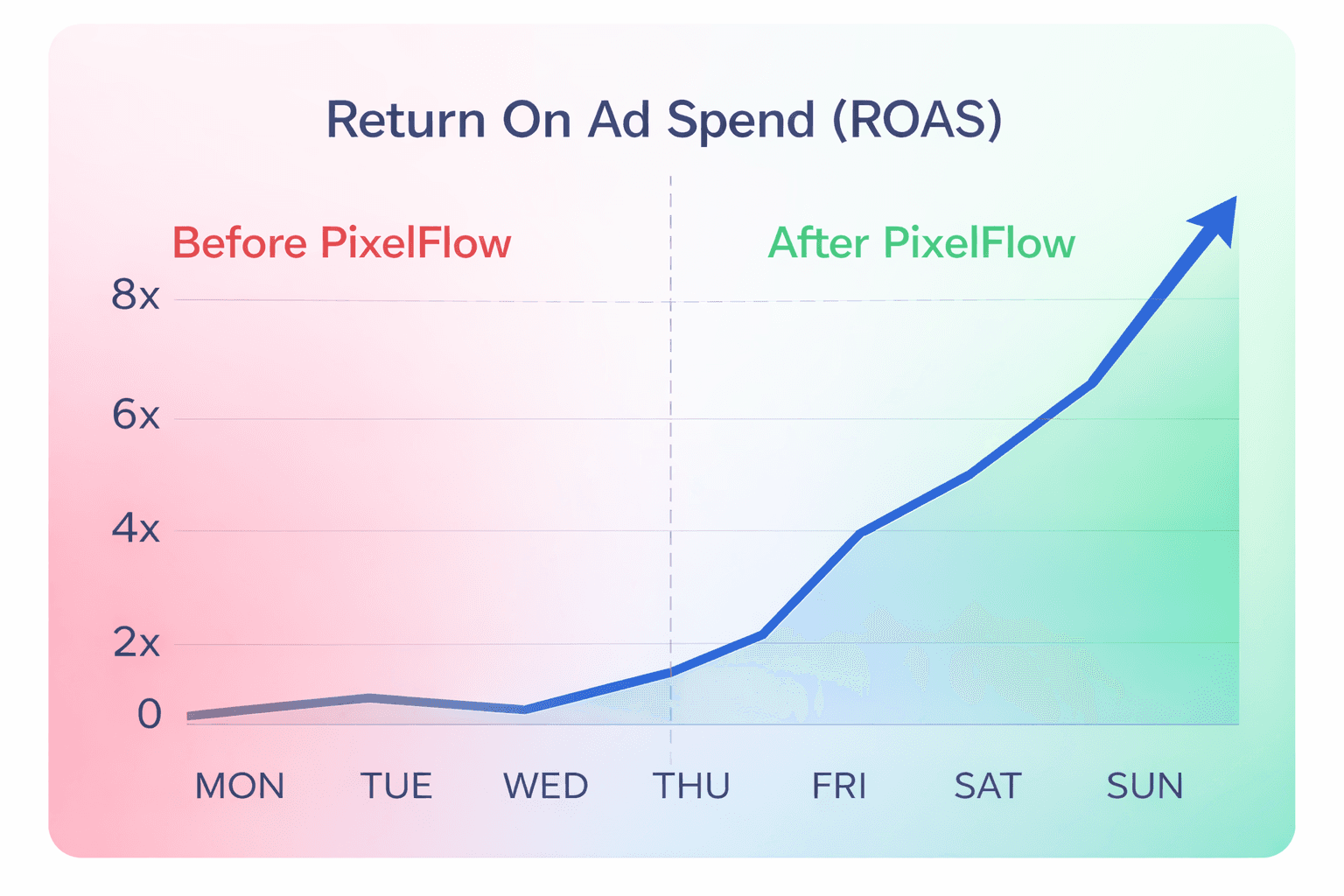
Better Tracking =
Better Ad Results
Better Tracking =
Better Ad Results
Better Tracking =
Better Ad Results
By using the Conversions API with PixelFlow you'll track more data resulting in:
By using the Conversions API with PixelFlow you'll track more data resulting in:
By using the Conversions API with PixelFlow you'll track more data resulting in:
Every click and customer interaction in Ads Manager
Every click and customer interaction in Ads Manager
Every click and customer interaction in Ads Manager
Accurate ROAS - know which campaigns to scale
Accurate ROAS - know which campaigns to scale
Accurate ROAS - know which campaigns to scale
Facebook able to find you more similar customers
Facebook able to find you more similar customers
Facebook able to find you more similar customers
How Does it Work?
What is server side tracking and the Conversions API?
If you're only using the Facebook Pixel to track conversions, you could be losing up to 40% of your data by iOS settings, ad blockers etc.
PixelFlow helps you solve this by sending data to a server first (via "Conversions API") where it can't be blocked and then to Facebook ads manager.
We made this solution simple enough that anyone can implement server side tracking in under 10 mins.
Curious to try it out? Try our playground to see how it works.
No need to bang your head against a wall trying to understand "data layers" and "variables".
PixelFlow is designed so anyone can implement server side tracking without needing a PHD in just 4 steps
If you're only using the Facebook Pixel to track conversions, you could be losing up to 40% of your data by iOS settings, ad blockers etc.
PixelFlow helps you solve this by sending data to a server first (via "Conversions API") where it can't be blocked and then to Facebook ads manager.
We made this solution simple enough that anyone can implement server side tracking in under 10 mins
Connect Meta
Connect Meta
Connect Meta
Install script
Install script
Install script
Send data to Meta via Pixel & CAPI
Send data to Meta via Pixel & CAPI
Send data to Meta via Pixel & CAPI
Get better ad results
Get better ad results
Get better ad results
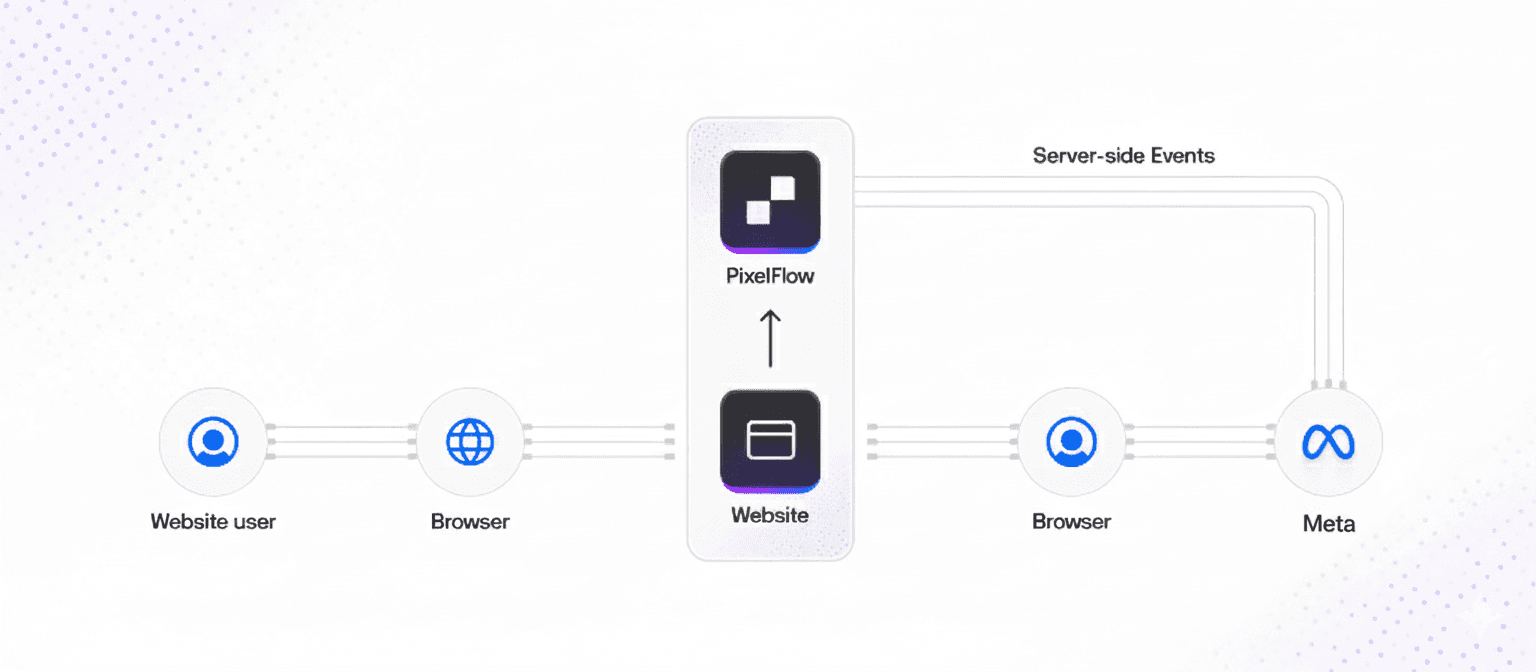
Since adding the Conversions API to our website, Facebook is sending us better traffic, we have more accurate ad manager reporting and we're now able to spend less while knowing which campaigns to scale
Since adding the Conversions API to our website, Facebook is sending us better traffic, we have more accurate ad manager reporting and we're now able to spend less while knowing which campaigns to scale
Since adding the Conversions API to our website, Facebook is sending us better traffic, we have more accurate ad manager reporting and we're now able to spend less while knowing which campaigns to scale

Who is it For?
PixelFlow is the ideal solution for you if:
Run Facebook Ads
You are or will run Facebook ads to your website and want more accurate reporting and data
Run Facebook Ads
You are or will run Facebook ads to your website and want more accurate reporting and data
Run Facebook Ads
You are or will run Facebook ads to your website and want more accurate reporting and data
Hate complexity
You don't want to have to deal with complexities like "dataLayers" or "Containers"
Hate complexity
You don't want to have to deal with complexities like "dataLayers" or "Containers"
Hate complexity
You don't want to have to deal with complexities like "dataLayers" or "Containers"
Want CAPI in mins
You don't want to have to wait weeks or pay hundreds of $ for a developer to set it up for you
Want CAPI in mins
You don't want to have to wait weeks or pay hundreds of $ for a developer to set it up for you
Want CAPI in mins
You don't want to have to wait weeks or pay hundreds of $ for a developer to set it up for you
If you're a founder, small business owner, marketer or agency and want better tracking without the complexities. then PixelFlow is for you.
Track What Matters
Track any event type (eg. Lead) and see it accurately attributed in your Facebook ads manager
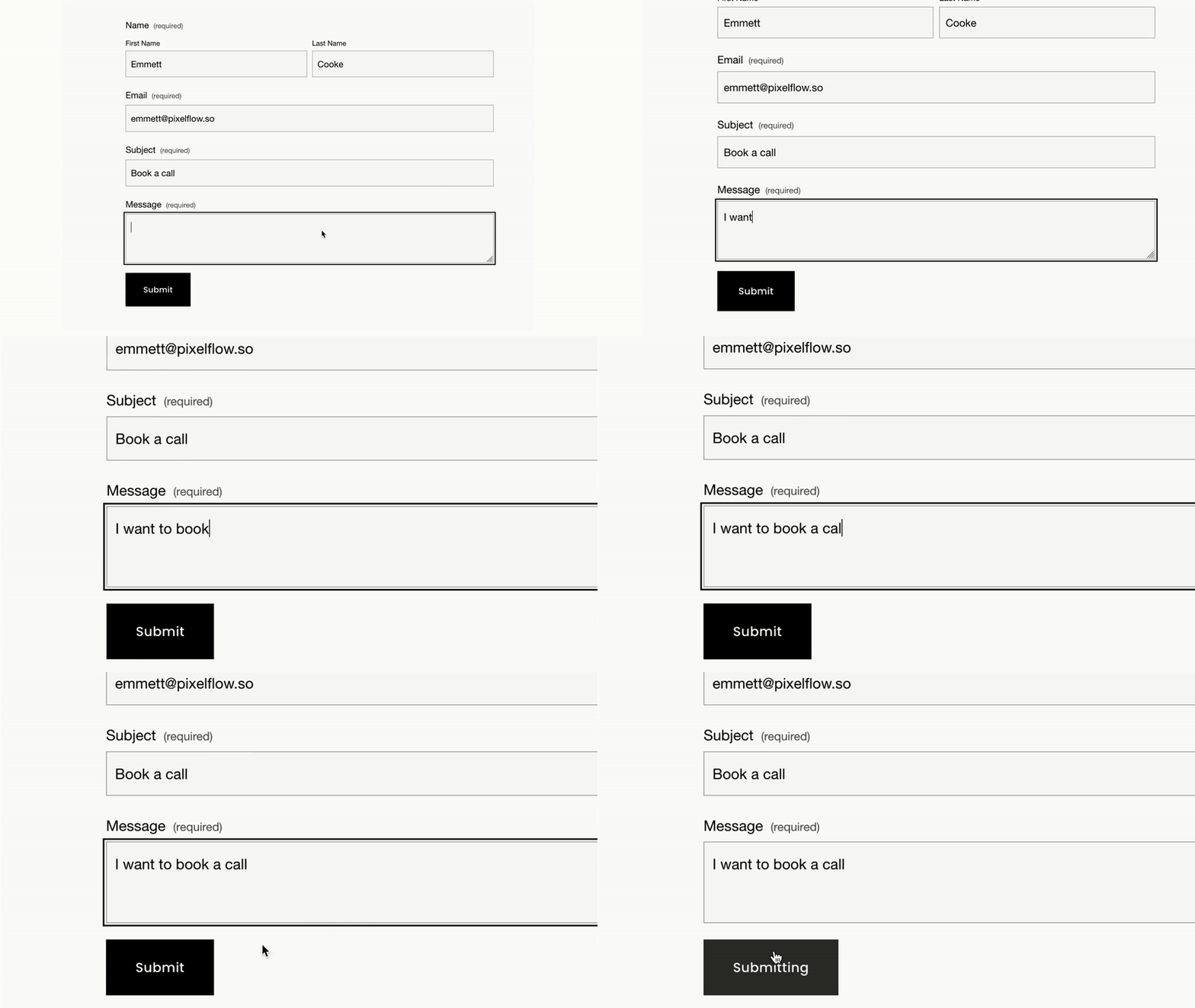
Track Forms
Trigger events to Meta when a user completes a form and send additional data like name, email, phone, location to enrich the event meta data
Track Forms
Trigger events to Meta when a user completes a form and send additional data like name, email, phone, location to enrich the event meta data
Track Forms
Trigger events to Meta when a user completes a form and send additional data like name, email, phone, location to enrich the event meta data
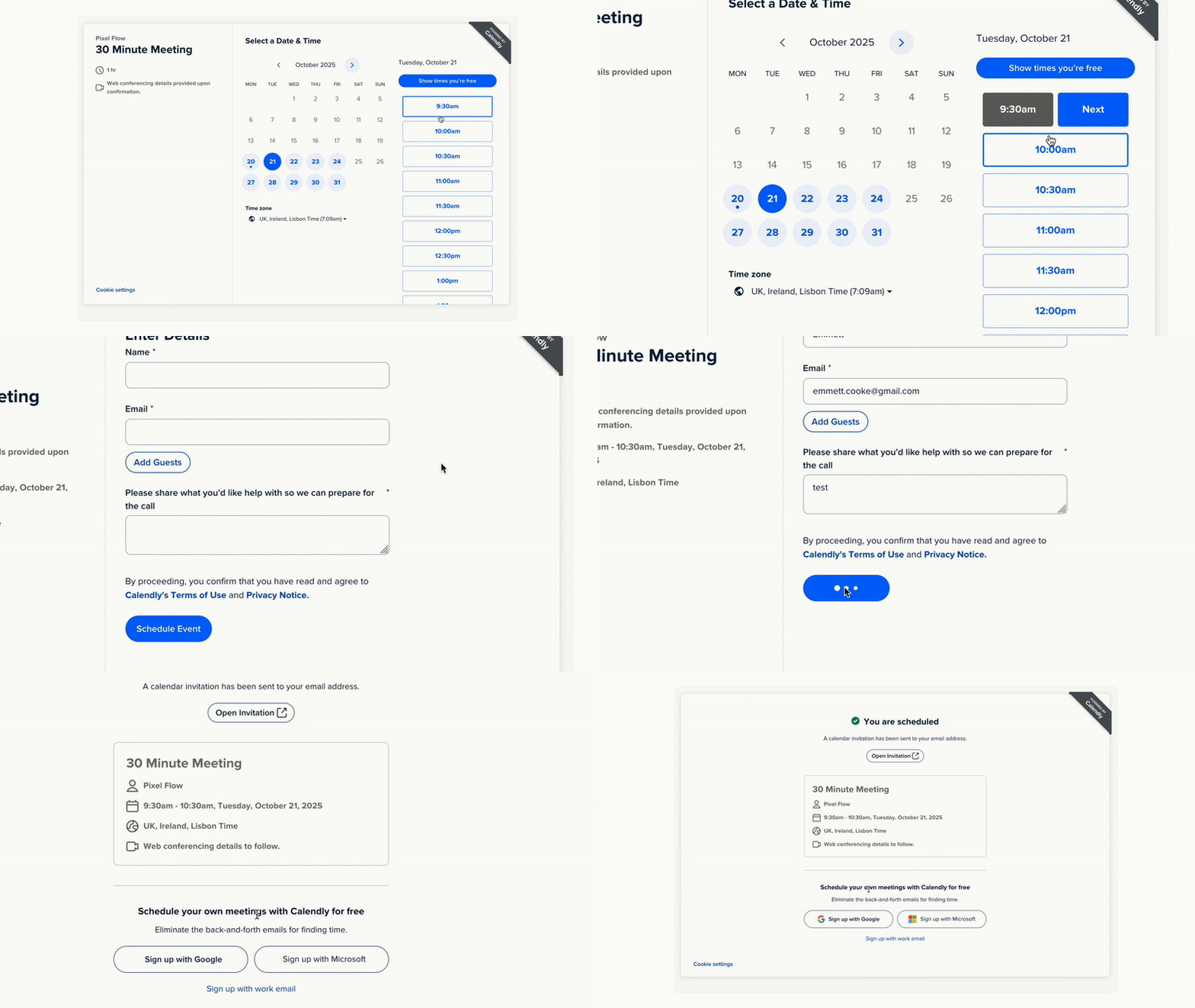
Track Booked Calls
Send a "Lead" (or any) event when someone books a call via Calendly or TidyCal on your website. Block duplicate events if someone rebooks their call time
Track Booked Calls
Send a "Lead" (or any) event when someone books a call via Calendly or TidyCal on your website. Block duplicate events if someone rebooks their call time
Track Booked Calls
Send a "Lead" (or any) event when someone books a call via Calendly or TidyCal on your website. Block duplicate events if someone rebooks their call time
Track Clicks
Tag any element including buttons, images etc. and trigger an event to Meta. For example send a "Donate" event when someone clicks a button
Track Clicks
Tag any element including buttons, images etc. and trigger an event to Meta. For example send a "Donate" event when someone clicks a button
Track Clicks
Tag any element including buttons, images etc. and trigger an event to Meta. For example send a "Donate" event when someone clicks a button

Track eCommerce
Automatically track all eCommerce events & data on WebFlow, Framer, WooCommerce & Squarespace. Easily track eCommerce events on any platform.
Track eCommerce
Automatically track all eCommerce events & data on WebFlow, Framer, WooCommerce & Squarespace. Easily track eCommerce events on any platform.
Track eCommerce
Automatically track all eCommerce events & data on WebFlow, Framer, WooCommerce & Squarespace. Easily track eCommerce events on any platform.
Trigger Events Easily
Easily tag and trigger an event in one of two ways

Choose a Page URL
Tag any element including buttons, images etc. and trigger an event to Meta when its clicked
Choose a Page URL
Tag any element including buttons, images etc. and trigger an event to Meta when its clicked
Choose a Page URL
Tag any element including buttons, images etc. and trigger an event to Meta when its clicked

Tag Any Website Element
Choose a page and select an event to trigger when a user visits that page (like "Contact")
Tag Any Website Element
Choose a page and select an event to trigger when a user visits that page (like "Contact")
Tag Any Website Element
Choose a page and select an event to trigger when a user visits that page (like "Contact")
Simple Pricing
Need more sites? 5 sites for $59/month or 10 sites for $99/month
$19
/ month
No credit card required
Install on 1 website
Unlimited event tracking
Event analytics
View high level metrics anytime
Unlimited sub domains
eg. app.yourdomain etc.
Event payload logs
See whats sent with every event
Track unlimited events
No limitations
Unlimited pixels
Send events to unlimited datasets
Free 7 days trial
Cancel anytime
Free setup help
Track Unlimited events
Simple Pricing
Need more sites? 5 sites for $59/month or 10 sites for $99/month
$19
/ month
No credit card required
Install on 1 website
Unlimited event tracking
Event analytics
View high level metrics anytime
Unlimited sub domains
eg. app.yourdomain etc.
Event payload logs
See whats sent with every event
Track unlimited events
No limitations
Unlimited pixels
Send events to unlimited datasets
Free 7 days trial
Cancel anytime
Free setup help
Track Unlimited events
Simple Pricing
Need more sites? 5 sites for $59/month or 10 sites for $99/month
$19
/ month
No credit card required
Install on 1 website
Unlimited event tracking
Event analytics
View high level metrics anytime
Unlimited sub domains
eg. app.yourdomain etc.
Event payload logs
See whats sent with every event
Track unlimited events
No limitations
Unlimited pixels
Send events to unlimited datasets
Free 7 days trial
Cancel anytime
Free setup help
Track Unlimited events
Our Guarantee
Better tracking and reporting than your previous setup or you don't pay
Trustpilot
I was banging my head against a wall with Stape & Google Tags Manager for days. This is just so simple, thank you!
I was banging my head against a wall with Stape & Google Tags Manager for days. This is just so simple, thank you!
What Happens After Signup?
Instant access to the dashboard (no credit card required)
Follow 4 setup steps
Optional free setup call
Events visible in Meta within minutes
Your ad targeting and reporting will improve in 48 hours
7 days later if you love it, choose a plan & continue
Instant access to the dashboard (no credit card required)
Follow 4 setup steps
Optional free setup call
Events visible in Meta within minutes
Your ad targeting and reporting will improve in 48 hours
7 days later if you love it, choose a plan & continue
I was banging my head against a wall with Stape & Google Tags Manager for days. This is just so simple, thank you!
I was banging my head against a wall with Stape & Google Tags Manager for days. This is just so simple, thank you!
Abby Wood., TheContentLab.ie.

What Happens After Signup?
Instant access to the dashboard (no credit card required)
Follow 4 setup steps
Optional free setup call
Events visible in Meta within minutes
Your ad targeting and reporting will improve in 48 hours
7 days later if you love it, choose a plan & continue
Every Feature - Zero Complexity
All the features you need for server-side tracking without needing a PHD
Event deduplication
Events are sent with the same eventID for automatic deduplication by Facebook
Real-Time Tracking
Events are sent with the same eventID for automatic deduplication by Facebook
Event deduplication
Events are sent with the same eventID for automatic deduplication by Facebook
Block bots & reloads
Block bot traffic & page refreshes showing up in your ad reports
Block bots & reloads
Block bot traffic & page refreshes showing up in your ad reports
Block bots & reloads
Block bot traffic & page refreshes showing up in your ad reports
Load CAPI & Pixel
PixelFlow loads your CAPI & Facebook pixel side by side so you don't have to
Load CAPI & Pixel
PixelFlow loads your CAPI & Facebook pixel side by side so you don't have to
Load CAPI & Pixel
PixelFlow loads your CAPI & Facebook pixel side by side so you don't have to
GDPR Ready
PixelFlow is compatible with all cookie consent plugins for GDPR
GDPR Ready
PixelFlow is compatible with all cookie consent plugins for GDPR
GDPR Ready
PixelFlow is compatible with all cookie consent plugins for GDPR
Event payloads
Full visibility of tracking withevent logs, analytics and payloads for each event
Event payloads
Full visibility of tracking withevent logs, analytics and payloads for each event
Event payloads
Full visibility of tracking withevent logs, analytics and payloads for each event
Programmatic API
Developer? You can trigger events programmatically using our API.
Programmatic API
Developer? You can trigger events programmatically using our API.
Programmatic API
Developer? You can trigger events programmatically using our API.
Lightweight script
No complex scripts that will slowdown your website load speeds
Lightweight script
No complex scripts that will slowdown your website load speeds
Lightweight script
No complex scripts that will slowdown your website load speeds
Useful analytics
See how many events have been tracked and in which category they belong to
Useful analytics
See how many events have been tracked and in which category they belong to
Useful analytics
See how many events have been tracked and in which category they belong to
Cross domain cookies
Cookie remains persistent across 3rd party sites and sub domains
Cross domain cookies
Cookie remains persistent across 3rd party sites and sub domains
Cross domain cookies
Cookie remains persistent across 3rd party sites and sub domains
GTM / Stape?
See how we compare against alternatives like GTM & Stape
Low cost done for you setup available
Facebook Pixel vs
Facebook Conversions API
Facebook Pixel vs
Conversions API
Pixel vs
CAPI
Why not just use the Facebook Pixel?
FACEBOOK PIXEL
Inaccurate FB manager reporting
Inaccurate FB manager reporting
Inaccurate FB manager reporting
Only sends browser events
Only sends browser events
Only sends browser events
Duplicate events fired
Duplicate events fired
Duplicate events fired
Hard to use alongside CAPI
Hard to use alongside CAPI
Hard to use alongside CAPI
Need to invest time in learning GTM
Need to invest time in learning GTM
Need to invest time in learning GTM
Tracking blocked by adblocker & iOS
Tracking blocked by adblocker & iOS
Tracking blocked by adblocker & iOS
Difficult to troubleshoot setup issues
Difficult to troubleshoot setup issues
Difficult to troubleshoot setup issues
Cookie doesn't last long
Cookie doesn't last long
Cookie doesn't last long


V/S

Up to 40% more data collected
Up to 40% more data collected
Up to 40% more data collected
Sends both browser & server events
Sends both browser & server events
Sends both browser & server events
Automatic event de-duplication
Automatic event de-duplication
Automatic event de-duplication
Loads both Pixel & CAPI for you
Loads both Pixel & CAPI for you
Loads both Pixel & CAPI for you
No week long courses to learn
No week long courses to learn
No week long courses to learn
Less likely to be blocked
Less likely to be blocked
Less likely to be blocked
Full event logs & payloads
Full event logs & payloads
Full event logs & payloads
Extended cookie lifetime
Extended cookie lifetime
Extended cookie lifetime
Event Match Score
9.3
/10
"PixelFlow gave us an average Event Match Quality of 9.3!"
Sebastian at studio-baguette.com/
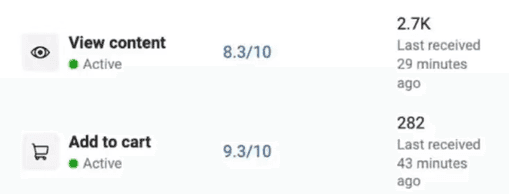
Event Match Score
8.3
/10
“We’ve never got to 8.3/10 for our search events so this impressive!"
Niall at reviewfox.co/
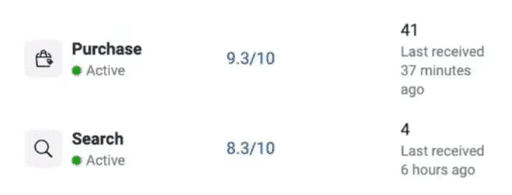
Event Match Score
9.3
/10
“PixelFlow got us to 9.3/10 for purchases which we've never seen! ”
Nick at irelandwebsitedesign.com
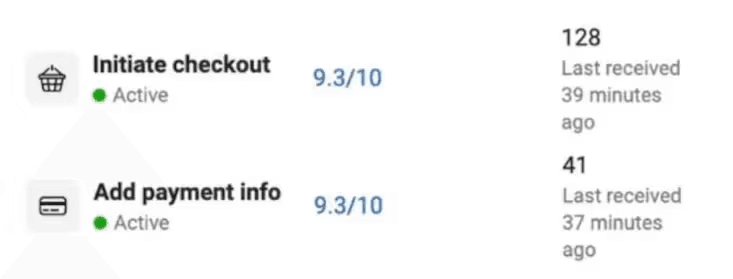
Event Match Score
9.3
/10
"PixelFlow gave us an average Event Match Quality of 9.3!"
Sebastian at studio-baguette.com/
Event Match Score
8.3
/10
“We’ve never got to 8.3/10 for our search events so this impressive!"
Niall at reviewfox.co/
Event Match Score
9.3
/10
“PixelFlow got us to 9.3/10 for purchases which we've never seen! ”
Nick at irelandwebsitedesign.com
Scale Your Ads Effectively
Scale Your Ads Effectively
Scale Your Ads Effectively
PixelFlow helps you dramatically increase your event match quality score in Meta events by tracking and sending as much information as possible with each event.
On average our users get anywhere from 8.3 to 9.30/10 and better event match quality scores means:
PixelFlow helps you dramatically increase your event match quality score in Meta events by tracking and sending as much information as possible with each event.
On average our users get anywhere from 8.3 to 9.30/10 and better event match quality scores means:
PixelFlow helps you dramatically increase your event match quality score in Meta events by tracking and sending as much information as possible with each event.
On average our users get anywhere from 8.3 to 9.30/10 and better event match quality scores means:
See more accurate ad data
See more accurate ad data
See more accurate ad data
Spend less to acquire customers
Spend less to acquire customers
Spend less to acquire customers
Facebook can find you more relevant traffic
Facebook can find you more relevant traffic
Facebook can find you more relevant traffic
Who Are We?
Hey I'm Emmett, the founder of PixelFlow.
If you've ever tried to setup the Meta Conversions API before, you've probably found:
Google tags manager is complex
You're missing events
There's errors everywhere
And if you don't have the CAPI setup, you'll find it difficult to scale your campaigns, because there's gaps in your tracking, resulting in innacurate reporting in ads manager.
The only solutions for setting up accurate tracking using the Conversions API were to hire a developer to setup "server side" tracking on some complex system that it would take weeks to learn (who wants to deal with containers, dataLayers, Variables etc.?)
On top of that every company was just "too big" to actually talk to someone.
We built PixelFlow to fix that. Our goal is to make high end tracking for Facebook ads available to everyone without the need for complex systems or paying developers hundreds of dollars. On top of that we are always available to help users anytime. We regularly jump on video calls throughout the day to help with tracking setup questions.
If you want server side "Conversions API" tracking without all of the complexity, PixelFlow is for you.
Hey I'm Emmett, the founder of PixelFlow.
We built this platform because I was frustrated with having to deal with broken tracking and reporting in Facebook ads manager.
On top of that, the only solutions for setting up accurate tracking using the Conversions API were to hire a developer to setup "server side" tracking on some complex system that it would take weeks to learn (who wants to deal with containers, dataLayers, Variables etc.?)
I also found that every company was just "too big" to actually talk to someone.
I built PixelFlow to fix that.
Our goal is to make high end tracking for Facebook ads available to everyone without the need for complex systems or paying developers hundreds of dollars.
On top of that we are always available to help users anytime. We regularly jump on video calls throughout the day to help with tracking setup questions.
If you want server side "Conversions API" tracking without all of the complexity, PixelFlow is for you.

PS. If you're a developer, we also offer programmatic API too.
PS. If you're a developer, we also offer programmatic API too.
Custom Setup
Want us to just set it up for you? We offer a low cost "done for you" option
Low cost done for you setup available
Reviews
Reviews
Reviews
We saw our costs drop 40% which is allowing us to scale massively.
I was banging my head against a wall with Stape & GTM for days. This is just so simple, thank you
Setup was effortless. PixelFlow was super fast, personable, and saved me tons of time and ad spend.
Just wanted to say thanks for building this plugin, its honestly so good.
Super easy to setup and just works! Thank you
Pixelflow puts us at the top of the paid social game with an average Event Match Quality of 9.3






We saw our costs drop 40% which is allowing us to scale massively.
I was banging my head against a wall with Stape & GTM for days. This is just so simple, thank you
Setup was effortless. PixelFlow was super fast, personable, and saved me tons of time and ad spend.
Just wanted to say thanks for building this plugin, its honestly so good.
Super easy to setup and just works! Thank you
Pixelflow puts us at the top of the paid social game with an average Event Match Quality of 9.3
Fix Your Meta Tracking Today
Accurate reporting and attribution for your Facebook Ads
Fix Your Meta Tracking Today
Accurate reporting and attribution for your Facebook Ads
Frequently Asked Questions

Server-side tracking (also called the Conversion API) is better than using the standard "Facebook Pixel" implementation because it works even if visitors have ad blockers, tracking prevention, or cookie restrictions enabled meaning you get more complete, accurate data to measure results and improve your ads. It tracks events on your website before they can be blocked by a user's browser meaning you can get more data sent to Meta events manager and in turn reduce your costs because your data is better and more accurate
PixelFlow tracks all events that users take on your website and send those events to Meta before the tracking can be blocked by the browser, adblocker, iPhone etc. This means you get far more accurate reporting data in your Meta events manager leading to reduced costs and increased conversions. Essentially you'll spend less on Meta ads and get a better return as you'll have more accurate data
PixelFlow picks up 30–40% more conversions that Meta Pixel misses - especially on iOS, Safari, or when ad blockers are active. While Meta relies on browser-side data (which gets blocked), PixelFlow uses server-side tracking to ensure you see the full picture - every click, sale, and signup, even the hidden ones.
Absolutely not - the PixelFlow script is only 11kb in size and designed to be super lightweight so as not to affect your site speed at all
YES absolutely. We love talking to customers. You can book a call anytime with us whether you're a paying customer or not. We're always available to hop on a call and help you out with tracking questions. Just book at https://tidycal.com/getpixelflow/30-minute-meeting
PixelFlow is compatible with cookie consent plugins and GTM so you can set it up to load only after consent has been given.
Frequently Asked Questions
Server-side tracking (also called the Conversion API) is better than using the standard "Facebook Pixel" implementation because it works even if visitors have ad blockers, tracking prevention, or cookie restrictions enabled meaning you get more complete, accurate data to measure results and improve your ads. It tracks events on your website before they can be blocked by a user's browser meaning you can get more data sent to Meta events manager and in turn reduce your costs because your data is better and more accurate
PixelFlow tracks all events that users take on your website and send those events to Meta before the tracking can be blocked by the browser, adblocker, iPhone etc. This means you get far more accurate reporting data in your Meta events manager leading to reduced costs and increased conversions. Essentially you'll spend less on Meta ads and get a better return as you'll have more accurate data
PixelFlow picks up 30–40% more conversions that Meta Pixel misses - especially on iOS, Safari, or when ad blockers are active. While Meta relies on browser-side data (which gets blocked), PixelFlow uses server-side tracking to ensure you see the full picture - every click, sale, and signup, even the hidden ones.
Absolutely not - the PixelFlow script is only 11kb in size and designed to be super lightweight so as not to affect your site speed at all
YES absolutely. We love talking to customers. You can book a call anytime with us whether you're a paying customer or not. We're always available to hop on a call and help you out with tracking questions. Just book at https://tidycal.com/getpixelflow/30-minute-meeting
PixelFlow is compatible with cookie consent plugins and GTM so you can set it up to load only after consent has been given.
Frequently Asked Questions
Server-side tracking (also called the Conversion API) is better than using the standard "Facebook Pixel" implementation because it works even if visitors have ad blockers, tracking prevention, or cookie restrictions enabled meaning you get more complete, accurate data to measure results and improve your ads. It tracks events on your website before they can be blocked by a user's browser meaning you can get more data sent to Meta events manager and in turn reduce your costs because your data is better and more accurate
PixelFlow tracks all events that users take on your website and send those events to Meta before the tracking can be blocked by the browser, adblocker, iPhone etc. This means you get far more accurate reporting data in your Meta events manager leading to reduced costs and increased conversions. Essentially you'll spend less on Meta ads and get a better return as you'll have more accurate data
PixelFlow picks up 30–40% more conversions that Meta Pixel misses - especially on iOS, Safari, or when ad blockers are active. While Meta relies on browser-side data (which gets blocked), PixelFlow uses server-side tracking to ensure you see the full picture - every click, sale, and signup, even the hidden ones.
Absolutely not - the PixelFlow script is only 11kb in size and designed to be super lightweight so as not to affect your site speed at all
YES absolutely. We love talking to customers. You can book a call anytime with us whether you're a paying customer or not. We're always available to hop on a call and help you out with tracking questions. Just book at https://tidycal.com/getpixelflow/30-minute-meeting
PixelFlow is compatible with cookie consent plugins and GTM so you can set it up to load only after consent has been given.